0 com
Windows 8 AIO 16 in 1 FINAL Build 9200 (Permanent Activator Included)
Version's Included in this ISO are:
This is Windows 8 Final (Build 9200)
 |
| From Bloger Santai |
 |
| From Bloger Santai |
 |
| From Bloger Santai |
 |
| From Bloger Santai |
 |
| From Bloger Santai |
Versions:
x86 (32-bit)
Windows 8 x86
Windows 8 N x86
Windows 8 Pro x86
Windows 8 Pro VL x86
Windows 8 Pro N x86
Windows 8 Pro with Media Center x86
Windows 8 Enterprise x86
Windows 8 Enterprise N x86
x64 (64-bit)
Windows 8 x64
Windows 8 N x64
Windows 8 Pro x64
Windows 8 Pro VL x64
Windows 8 Pro N x64
Windows 8 Pro with Media Center x64
Windows 8 Enterprise x64
Windows 8 Enterprise N x64
Direct Download Link
File size: 4 GBhttp://x--z.com/dl/win8/Windows8_16_in_1_Final_Build_9200_Oxava.com.part1.rar
http://x--z.com/dl/win8/Windows8_16_in_1_Final_Build_9200_Oxava.com.part2.rar
http://x--z.com/dl/win8/Windows8_16_in_1_Final_Build_9200_Oxava.com.part3.rar
http://x--z.com/dl/win8/Windows8_16_in_1_Final_Build_9200_Oxava.com.part4.rar
http://x--z.com/dl/win8/Windows8_16_in_1_Final_Build_9200_Oxava.com.part5.rar
http://x--z.com/dl/win8/Windows8_16_in_1_Final_Build_9200_Oxava.com.part6.rar
Cara Install
<1> Download file rar Part1-Part6,simpan dalam satu folder terus Extrax file "Part1" nya saja,nanti yang lain ikut ter extrak juga.kalau di minta masukin password ada bawah,atau liat file "readme" setelah file di extrak.
<2> Buat jadi Bootable file .ISO hasil Extrak tadi,gunakan "software Windows7 USB/DVD Download Tools" untuk mem-burning ke DVD atau FlashDisc
<3> Booting PC/Notebook via DVD/FLASHDISC yang sudah Bootble tadi,masukan DVD lalu (masuk BIOS dengan cara restart Pc,tekan DEL sebelum Pc nyala.kalau DEL ga bisa coba ulangi dan tekan tombol F2) Geser ke menu BOOT,Ubah Boot Priority Ke DVD,setelah selesai tekan F10
<4> Selanjut nya akan ada permintaan untuk memilih Windows 8 mana yang akan di install,ada 2 jenis win8 (x86 atau 32bit & x64 atau 64bit) dan 8 versi win8 untuk x86 & x64 jadi ada 16 total nya.tunggu hingga insttal selesai.
<5> Setelah install win 8 selesai,restart lagi PC/Notbook nya masuk lagi ke BIOS dan pindahkan lagi Boot priority ke HardDisc,tekan F10.Sekarang DVD sudah bisa di keluarkan.
Aktivasi windows 8 All version
<1> dalam file yang agan download setelah di Extrak terdapat folder "Aktivator"
<2> Jalan kan file ACTIVATOR_KJ.120829 dengan cara "RUN AS ADMIN (sorot file,klik kana,pilih Run as administrator)
<3> Lalu pilih WINDOWS 8 INSTALL/UNINSTALL
<4> Akan muncul WINDOWS CMD pastikan tekan "Y" (tanpa tanda kutip) sampai muncul "Activation Sucssesffu"
<5> Semua proses berjalan lancar setela saya tes cara di atas,untuk lebih jelasnya silahkan buka file "readme"
<1> dalam file yang agan download setelah di Extrak terdapat folder "Aktivator"
<2> Jalan kan file ACTIVATOR_KJ.120829 dengan cara "RUN AS ADMIN (sorot file,klik kana,pilih Run as administrator)
<3> Lalu pilih WINDOWS 8 INSTALL/UNINSTALL
<4> Akan muncul WINDOWS CMD pastikan tekan "Y" (tanpa tanda kutip) sampai muncul "Activation Sucssesffu"
<5> Semua proses berjalan lancar setela saya tes cara di atas,untuk lebih jelasnya silahkan buka file "readme"


Whats new in version 6.12 Build 25?
Added support for latest youtube changes. Now IDM download panel allows the choice of video resolution again
Release name:
Tonec.Inc.Internet.Download.Manager.v6.12.25.Incl.Keygen.and.Patch-ROF
Size: 4.9MB
Cara Install
1.unzip,unrar,install program
2.gunakan keygen lalu patch
3. Enjoy
Download
http://ul.to/49ge3xzt
UC Browser v8.2.2
REQUIREMENTS:ANDROID 2.1 and
up

REQUIREMENTS:ANDROID 2.1 and
up
UC Browser, your choice along with 300
million people
Stop wasting your time for website loading, try
UC Browser, the fastest, smartest mobile
browser, the largest mobile browser worldwide,
300 million users' choice in 150 countries .
- Best Mobile Browser Awards 2011 –
About.com
-Best Android Browser Awards 2012 --
About.com
Features:
million people
Stop wasting your time for website loading, try
UC Browser, the fastest, smartest mobile
browser, the largest mobile browser worldwide,
300 million users' choice in 150 countries .
- Best Mobile Browser Awards 2011 –
About.com
-Best Android Browser Awards 2012 --
About.com
-Multi-touch: With the swipe of your fingers,
you can open, close, switch , and going
backwards and forwards much faster and easier
when surfing the web.
-VOX(voice control): UC Browser, upon
recognizing your voice, will take you to your
destination automatically, without any use of the
finger.
-Cloud Acceleration: With continuous
optimization, UC browser's new kernel can
function better with UC cloud acceleration,
giving you unprecedented speed in web surfing.
-RSS Reader: Integrated RSS reader allowing
you to visit your favorite sites with one simple
touch.
-Auto-focus: Are you bothering for the ads and
other un-related contents? Just click the area you
want to read, then the page will auto focus on
the content you are interesting, no more zoom in
or out, automatically fitting to the size of your
screen.
We hope to hear your voice! Come to us at
feedback@ucweb.com
Know more about us on YouTube:http://
www.youtube.com/ucwebvideo
Chat with us on Facebook: https://
www.facebook.com/ucmob
Or Twitter: https://twitter.com/#!/
UCBrowser
What's New
What's in this version:
Multi-touch: you can now stop recalling
complex gestures, UC Multi-touch fulfills all
major controls with a simple swipe of your
fingertips.
VOX(voice control): Navigate, search , and
controls the browser by listening to your voice
command.
RSS Reader: We are well aware that you have
your preferred channels on the internet. Now
UC browser has integrated RSS reader which
allows you to visit your favorite site with one
simple touch.
Code:
detile
you can open, close, switch , and going
backwards and forwards much faster and easier
when surfing the web.
-VOX(voice control): UC Browser, upon
recognizing your voice, will take you to your
destination automatically, without any use of the
finger.
-Cloud Acceleration: With continuous
optimization, UC browser's new kernel can
function better with UC cloud acceleration,
giving you unprecedented speed in web surfing.
-RSS Reader: Integrated RSS reader allowing
you to visit your favorite sites with one simple
touch.
-Auto-focus: Are you bothering for the ads and
other un-related contents? Just click the area you
want to read, then the page will auto focus on
the content you are interesting, no more zoom in
or out, automatically fitting to the size of your
screen.
We hope to hear your voice! Come to us at
feedback@ucweb.com
Know more about us on YouTube:http://
www.youtube.com/ucwebvideo
Chat with us on Facebook: https://
www.facebook.com/ucmob
Or Twitter: https://twitter.com/#!/
UCBrowser
What's New
What's in this version:
Multi-touch: you can now stop recalling
complex gestures, UC Multi-touch fulfills all
major controls with a simple swipe of your
fingertips.
VOX(voice control): Navigate, search , and
controls the browser by listening to your voice
command.
RSS Reader: We are well aware that you have
your preferred channels on the internet. Now
UC browser has integrated RSS reader which
allows you to visit your favorite site with one
simple touch.
Code:
detile
Requirements: Android 1.6+
Overview: GO SMS Pro is a total enhancement for stock messaging app, much faster, more functions; with cool
UI, chat/list style, popups, backup/restore, scheduler, encryption, blacklist, folders, many themes, tons of
settings; Include almost ALL functions you want for texting, it is very popular, get it and try it.
Trusted app, supported by trusted GO Dev Team, bringing your texting(SMS/MMS/Facebook Chat) to a new
level
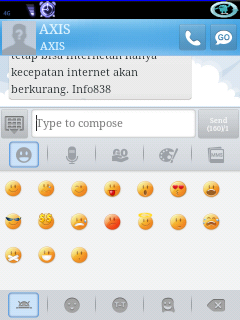
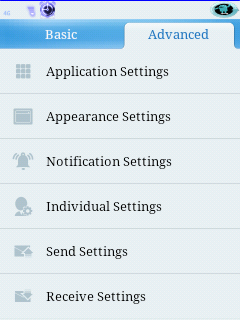
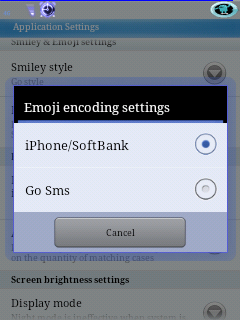
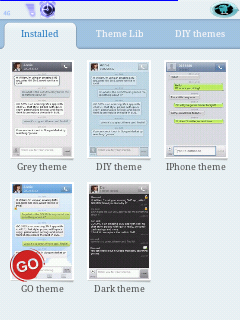
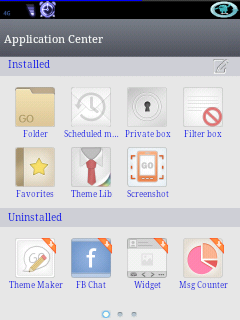
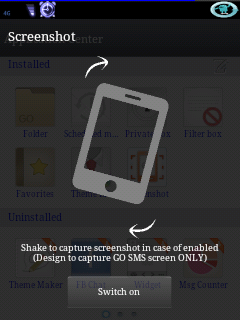
-- Full SMS/MMS support, also Facebook,Chat integration with GO FB chat plug-in
-- GO-MMS service (FREE), you may send picture/music to your friend(ever they are no GO SMS) through one
SMS with 2G/3G/4G or WIFI
-- Popup with quick reply, privacy mode
-- Notification with privacy mode and reminder notification
-- Many cool themes; also support DIY theme, and Wallpaper Maker plug-in; Fully customizable look; Supports
chat style and list style; Font changeable
-- Security lock, support lock by thread; Blacklist
-- SMS backup and restore by all or by conversations, supports XML format, send backup file by email
-- Settings backup and restore
-- Support schedule SMS; Group texting
-- Support folders view: Inbox, Outbox, MMS,created folders, encrypt folders
-- Individual contact customization for Notification,Ringtones, Signature and Conversation
-- Support Emoji with Emoji pulg-in
-- 1x1 icon widget with message count and 4x2 medium widget
-- Quick text management
-- Batch modes (add contacts, delete conversations/messages and backups)
-- Support GESTURE, you may switch "Messages" and "Folders" view by left/right slip; Many 3D & 2D transition
effect
-- Support English, Chinese, Korean, Traditional Chinese, German, Greek, Italian, Russian, Spanish, Swedish,
Polish, Czech, Japanese; Get languages package in market
-- Handy, build-in Contacts. Quick find: by letter, name, keyword. Support phone group, Google group and GO
SMS group
-- Stock SMS can be removed (but please be care)
-- Localization support for accented chars without using Unicode
-- Split large messages for CDMA
-- Time offset adjustment
-- Avoid disordered messages: sort by time or by order of messages sent/received
-- Facebook contact photo support
-- Night mode
-- Messages grouping (Group mode or Separate mode)
★ Most users' feedback: Love how it's easy to use and very fast; Nicer, slimmer and smoother than Handcent What's in this version:
SMS and chompSMS
♥ LOVE:
▪ We are always listening to and working hard for our users! Please Encourage us by:
-- Giving a high rating if you like it
-- Recommending GO SMS to your friends,Thanks
▪ When meet issue, please firstly referred carefully to:
-- "MustKnow tip"
-- "Help"
-- "Important Tips" in Settings
V4.37 Update (2012-3-13)
1.Reconstruct new users’ guide
2.Optimize picture viewer, enable double click to zoom in
3.Optimize close process of popup window
4.Add popup tips when sending GO Chat and GO Share
5.Enhance security of GO Chat database, prevent other app from access
6.Support display Emoji in all GO SMS UI
7.Fix some minor bugs
Detail Apps | Download gs438.apk - 5.3 MB
3G/4G Speed Optimizer Pro v1.3.0
Requirements: Android v2.1+, ROOT & BUSYBOX NEED
This app optimizes your Data network speed.
Developed by Vista(@NexusRoi).
all phones are supported. Just need root!!!
* Little donation( buying pro version!) or AD clicks would be helpful for developers. ^^*
based on Build.prop Optimization.
needs busybox.
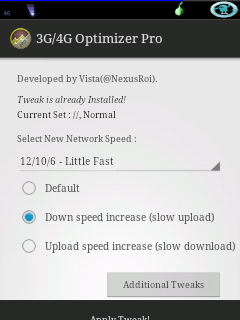
Number/Number/Number (example: 10/10/6) means GPRS Class/Max download speed/Max upload speed.
Speaking Simply, Higher value boosts your data network speed,
but it can causes battery drain.
and you can choose Download speed increase option (slow upload speed) / Upload speed increase(slow
download speed) option.
- Donation version(PRO) features -
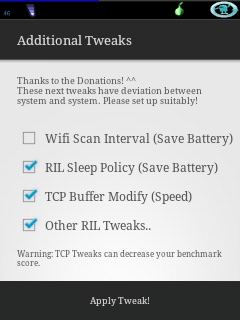
Use clear white theme, and includes additional tweaks(such as Wi-Fi scan interval tweak, TCP Buffer tweak, RIL
sleep policy tweaks).
Little donation would be helpful for developers!
If you have a question or problem, please contact to:
Twitter (@NexusRoi)
E-mail (retail3210@gmail.com).
Thank you!
Recent changes:
Version 1.3.0
- Tweak bug fixed
- Added new "Efficient"(10/25/7) Preset
- Preset value has adjusted perfectly :)
- UI Improvements
Less description »
Latest version: 1.3.0 (for Android version 2.1 and higher)
Detail about apps | download o13g0.zip - 1.5 MB
Subscribe to:
Posts (Atom)


